
Check one person in Instagram
- Open Instagram and go to your own profile. Check the username at the top if you use more than one account.
- Tap Following. Search for the person’s full username to confirm that you follow them.
- Return to your profile, tap Followers, and search for the same username. Wait for the search to finish.
- If you find them in Following but not Followers, they aren’t following you back. If they’re in both, you follow each other.
Use the @username on the person’s profile, not their display name. Several people can share a name, and an old username may have changed. If the search fails to load, retry before interpreting an empty result.
Compare the names, not the totals
Start with Following and remove every name that also appears in Followers. What remains is the list you want. Reversing those lists finds people who follow you but whom you don’t follow back.
| Username | Following | Followers |
|---|---|---|
 @sofia.mora | Present | Present |
 @maya.lestari | Present | Present |
 @alex.rivera | Present | Absent |
 @leo.pratama | Absent | Present |
@alex.riveraAlex doesn’t follow back. @alex.rivera is only in Following, and @leo.pratama is only in Followers, which means Leo follows you and you don’t follow Leo. Sofia and Maya appear in both lists, so you follow each other.
Both totals are three. Equal follower and following counts can still hide one-sided relationships, so subtracting the numbers on your profile won’t give you the names.
Open the report in Unfollowers on iPhone
For regular checks, Unfollowers puts the comparison in one report. Viewing the names may require Premium, even when you can already see the count on Home. Home also shows when your account was last updated.
- Open Unfollowers and connect your Instagram account. Complete the sign-in steps shown on the Instagram screen and wait for the analysis to finish.
- Go to Home and check the profile shown at the top. If you are returning to an older result, tap Update or pull down to refresh, then wait for completion.
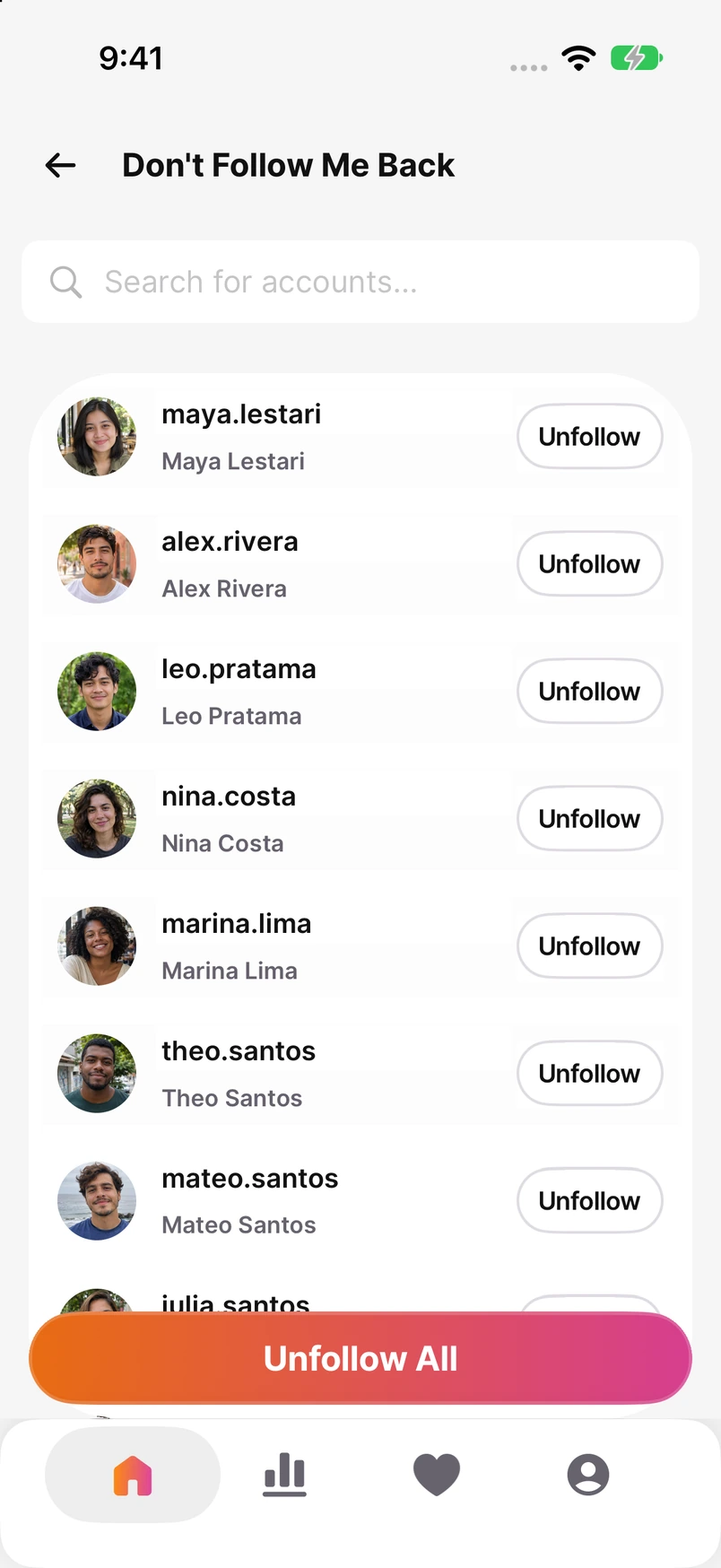
- Tap Don’t Follow Me Back on Home to open the report.
- Review the usernames in the report. Use its search field when you want to find a specific person.
The first complete analysis can answer this question. You don’t need a second day of data: the report compares Following with Followers from the same check. If the lists are still loading or unavailable, finish the update before relying on the result.
Direct follow and unfollow actions require Premium. Check the subscription offers in the app. Our comparison explains what Unfollowers and other iPhone apps offer, including their paid features.
See Unfollowers for iPhone Compare Instagram unfollower apps
Check a larger list for free
You can also download the two lists from Instagram and compare them yourself. Start in your profile menu, open Meta Account or Accounts Center, then Your information and permissions and Export your information. Create an export for the right profile, choose Export to device, and select the follower and following information. The settings name can differ while Meta moves accounts between these menus.
- Request Following and Followers in the same export. Choose All time, or the widest date range offered, and HTML if available so you can read the files in a browser.
- Download and extract the archive, keeping the original files. Copy Following usernames into column A and Followers usernames into column B of a spreadsheet, one username per row.
- Include all parts of each list if the export contains several files. Remove duplicate entries and extra spaces, and use the same spelling format in both columns.
- Find the names in column A that have no match in column B. Use the ready-to-copy formula in our free-method guide for a long list.
A missing Followers file can make someone look like a non-follower, so check the files before acting on the result. Use lists from the same check: pairing last month’s Followers with today’s Following mixes different relationships.
Download the files and compare them in a spreadsheet
If you prefer ChatGPT, give it the two prepared username lists and ask for names in Following but absent from Followers. Our guide includes a prompt you can copy and a sample answer to check. Only share the two lists needed for the comparison.
Compare the lists with ChatGPT
Does this tell me who unfollowed?
No. Someone who doesn’t follow you back may never have followed you. To find a past change, compare an earlier Followers list with a later Followers list. The current list alone cannot tell you whether that account used to follow you.
How to see who unfollowed you on Instagram
Choose whom you want to keep following
A report can help you tidy up Following, but a missing follow back doesn’t have to change anything. You might follow an artist for their work or a shop for updates. Keep the accounts you still want to see.
To unfollow someone in Instagram, open their profile, tap Following, then Unfollow. With Premium in Unfollowers, choose the accounts you want to unfollow, review your selection, and start the actions. Opening the report does not unfollow anyone. To follow someone back instead, open I Don’t Follow Back on Home and choose the accounts there.
Frequently Asked Questions
Can I check who doesn’t follow back on Android?
Yes. Search Following and Followers in Instagram or compare your exported lists. The Unfollowers app linked here is for iPhone.
Why is someone still in the report after I unfollowed them?
Check the relationship on their Instagram profile, then refresh your account in Unfollowers. A saved report can still show the result from before your change; check the last-update time on Home.
What if my request to follow a private account is still pending?
A pending request is not an accepted follow. Check the Requested status on their Instagram profile before counting it as an account you already follow.