
Choose the check you need
- One person: search their username in your Instagram Followers list to check whether they follow you now.
- Changes from now on: complete an analysis in Unfollowers, refresh the account later, and open Progress to review the saved changes.
- You already have an older list: compare it with a newer follower list from the same account. Check the names that appear only in the older copy.
Check one person in Instagram
- Open Instagram and go to your own profile. Check the username at the top if you use more than one account.
- Tap Followers below your profile details.
- Search for the person’s full username and let the results load. Use the @username shown on their profile.
- If the account appears, it is on your current follower list. If not, open the person’s profile to check their current username, then search again with that spelling.
If their current username still does not appear, it is missing from your follower list. An older list can tell you whether it used to be there. If Instagram reports a loading error or cannot display the list, try again later before drawing a conclusion.
Track later changes with Unfollowers on iPhone
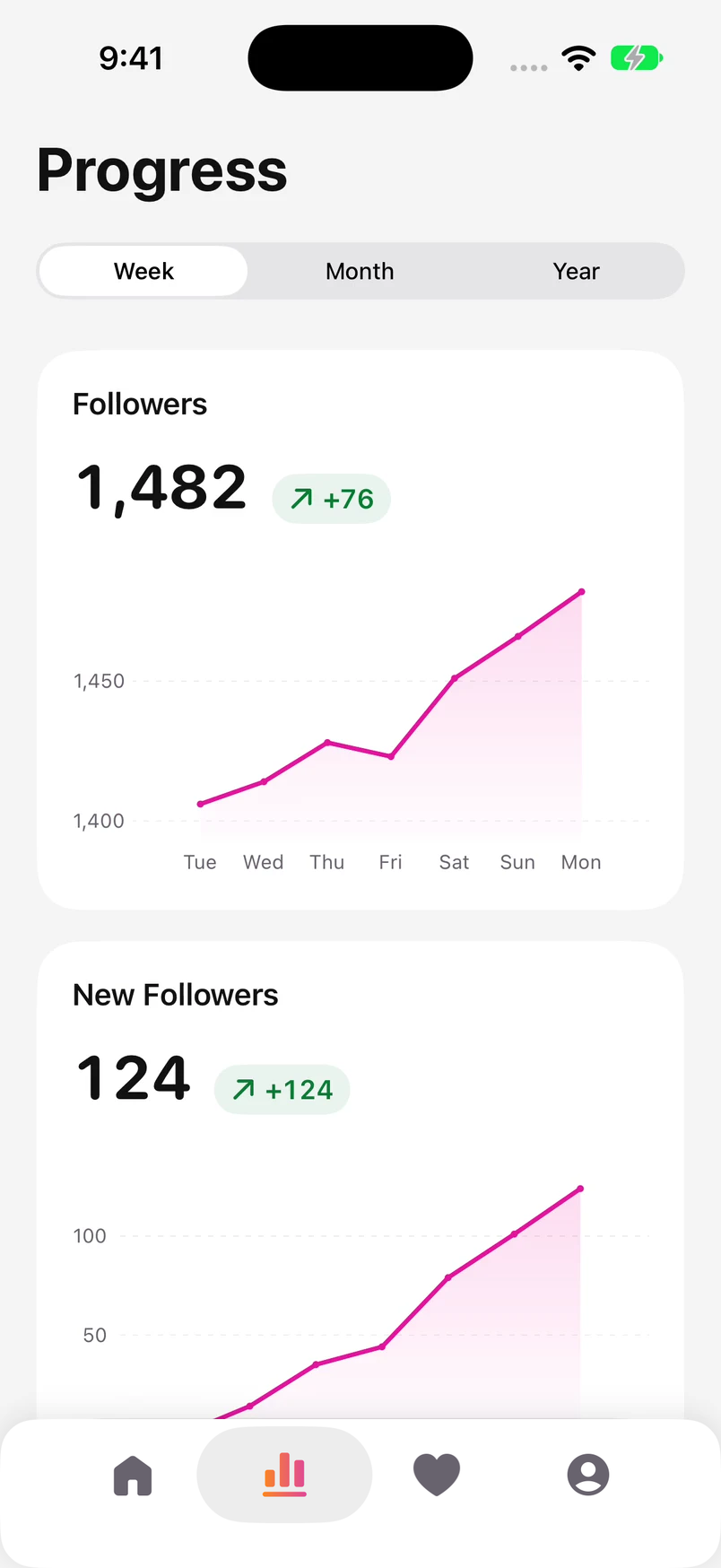
Unfollowers keeps repeated checks in one place, so you do not have to prepare a spreadsheet each time. In Progress, you can select a day on the follower chart and open the names saved for that date.
- Open Unfollowers, connect your Instagram account, and finish any sign-in steps shown on the Instagram screen. Wait for the analysis to finish.
- On Home, check that the account header shows the right profile. Look at the last-update time so you know which check you are reading.
- When you want to check again, return to Home and use Update or pull down to refresh. Let the new analysis complete.
- Open Progress and choose Week or Month. On the Followers chart, tap a date or move your finger along the chart to select an observation.
- If Lost Followers appears in the date’s details, tap it to open the saved report. New Followers opens the accounts added in that comparison.
Read the message beside the selected date. A day without an update can show the last known count. If no people history was saved, the chart cannot supply the missing names. Neither message means that nobody unfollowed. A new update on Home adds a fresh record; it does not fill gaps in older history.
If the report’s names are locked, the app shows a Premium option. Search a username from the report in Instagram to check whether that account still follows you. Our app comparison explains the published features and paid access for each option.
See Unfollowers for iPhone Compare Instagram unfollower apps
Compare an older follower list with a newer one
Use two complete Followers lists for the same Instagram account. Keep the original files and label each copy with the date you saved it. Do not replace the older file when you download the next one.
| Username | Earlier | Later |
|---|---|---|
 @sofia.mora | Present | Present |
 @maya.lestari | Present | Present |
 @alex.rivera | Present | Absent |
 @leo.pratama | Absent | Present |
@alex.rivera@alex.rivera is missing from the newer list. @leo.pratama is new, while Sofia and Maya appear in both. The follower count stays at three: one loss and one gain cancel each other out. A net change of zero would hide both names.
- Put the older follower usernames in one column and the newer follower usernames in another. Use Followers for both columns, not Following.
- Include every part if an export splits the list into several files. Remove duplicate names and extra spaces before comparing.
- Find the names present in the older column but absent from the newer one. Check each profile’s current username and follow status in Instagram before calling it an unfollow. If you cannot open the profile, leave the cause unconfirmed.
For a handful of names, sort both columns alphabetically and check each name from the older list against the newer one. For a longer list, use the spreadsheet formula in our no-app guide. It also shows how to find all the files you need.
Compare exported follower lists without an app
Get the lists without another app
Start in your Instagram profile menu. Open Meta Account or Accounts Center, then Your information and permissions, followed by Export your information. Create an export for the right profile, choose Export to device, and select the follower information. Meta is gradually moving accounts to the Meta Account menu, so you may still see Accounts Center.
Our no-app guide walks through the export settings, file formats, and spreadsheet comparison. It also includes a ChatGPT prompt for comparing two supplied lists. Share only the usernames needed for the task if you choose that route; the rest of your account archive is unnecessary.
Download and prepare your Instagram lists Compare the lists with ChatGPT
Looking for people who do not follow back?
Use your current Following and Followers lists for that question. Someone you follow may never have followed you, so their presence in a “doesn’t follow back” report does not make them a recent unfollower. You can check the current relationship straight away.
See who doesn’t follow you back on Instagram
Frequently Asked Questions
Can I find the exact time someone unfollowed me?
Two follower lists show a change between two checks. The date of an analysis is the time you observed it, not a record of the exact moment someone tapped Unfollow.
Why does Unfollowers still show old numbers?
Check the last-update time on Home and run a new update. Wait for it to finish before reading the results. If the app shows a sign-in or collection problem, follow that message before trying to interpret the older data.
Can I do this on Android?
You can search your Followers list in Instagram or compare exported lists on Android. The Unfollowers app linked in this guide is for iPhone.